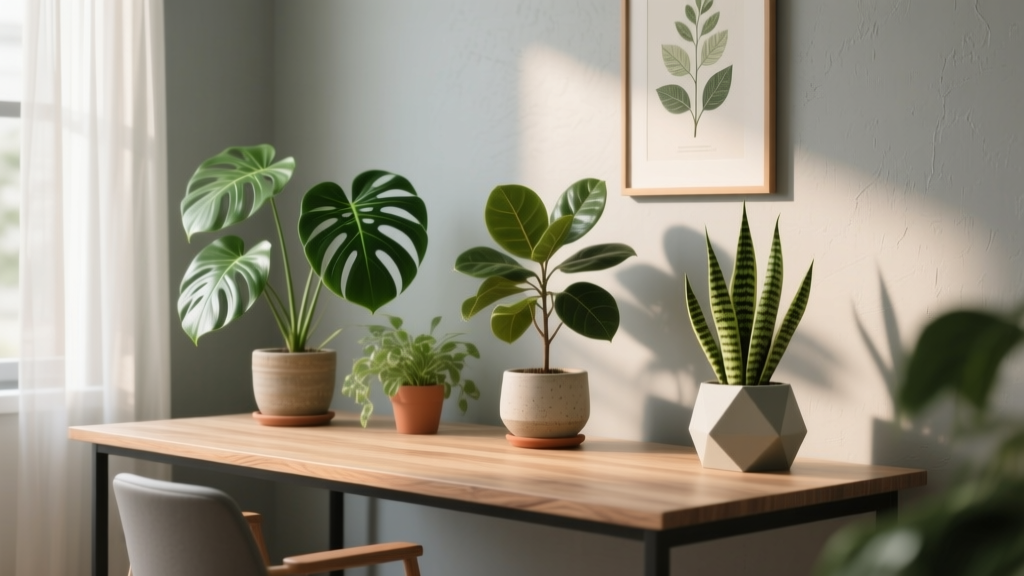
Office Plant Setup for a Healthier Workspace
It’s 3:17 p.m., your eyes are dry from staring at a screen, and the “air” in the room feels like it’s been filtered through a printer. You glance at the corner where you meant to put something green, but it’s still a stack of cables and a forgotten coffee mug. The space isn’t bad—it’s just unfinished. The fix doesn’t require a renovation. It requires a layout plan: plants placed where they actually work with your light, your traffic flow, your desk habits, and your tolerance for weekly care.
I’m going to walk you through setting up an office plant layout the way a designer would: start with the constraints, map the microclimates, then select plants that match the conditions and the maintenance you’ll realistically do. By the end, you’ll have a setup that looks intentional, functions well, and stays healthy without becoming another chore.
Start With the “Office Map”: Light, Movement, and What You’ll Actually Maintain
Measure first: three numbers that shape everything
Before you buy plants, take five minutes with a tape measure. The measurements that matter most:
- Window distance: Measure from the glass to your desk edge. Most indoor plants that tolerate “bright indirect light” want to be within 2–6 ft of a bright window.
- Walkway clearance: Keep at least 24 in clear for a comfortable path around a chair and door swing.
- Available floor footprint: A common “plant corner” can be as small as 24 in x 24 in if you build vertically with a stand or shelf.
Clock your sunlight hours (don’t guess)
Watch the window for one day (or use a phone compass + quick notes). Track how many hours of direct sun hit the room:
- 0–1 hour direct sun: low-light strategy (tough plants, closer placement to the window, lighter pots)
- 2–4 hours direct sun: most adaptable office plants thrive, with sheer curtain diffusion if needed
- 5+ hours direct sun: treat it like a sunroom—choose sun-tolerant plants or pull others back 3–8 ft from the glass
Design note: in most homes, the light falls off quickly. A plant placed 10 ft from a window is often in “low light” even if the room feels bright to you.
Create three plant zones: desk, mid-zone, and anchor zone
This is the backbone of a clean office layout:
- Desk zone (0–2 ft from you): small plants that tolerate occasional neglect and won’t shed leaves onto keyboards
- Mid-zone (2–6 ft from window): medium plants that provide mass and soften the room without blocking movement
- Anchor zone (floor corners / behind chair): one larger plant or a cluster that visually “finishes” the room
Layout Strategies That Feel Designed (Not Random Pots)
Use the “triangle composition” for instant cohesion
Pick three plant heights—small, medium, tall—and arrange them in a triangle so your eye moves naturally. Example for a 10 ft x 12 ft office:
- Tall: 4–6 ft plant in a floor pot (anchor zone)
- Medium: 18–30 in plant on a stand (mid-zone)
- Small: 4–10 in desk plant (desk zone)
Spacing rule: keep 6–12 in between pots so leaves don’t mash into each other (better airflow, fewer pests).
Build vertical “green architecture” in tight spaces
If your floor space is limited (common for renters), go up:
- Plant ladder shelf: footprint around 24 in x 14 in, holds 4–6 plants without crowding your chair
- Wall-mounted shelves: keep shelves 12–16 in deep; mount above shoulder height to avoid bumps
- Hanging planters: reserve for plants that don’t drop debris (pothos is great; ficus can be messy)
Control glare and heat with plant placement
Plants can soften harsh light and make screen time easier, but you need to place them strategically:
- Put a taller plant 2–3 ft to the side of a window (not directly in front) to reduce glare without blocking daylight.
- Keep foliage 12+ in away from radiators or HVAC vents; repeated hot/cold blasts cause leaf drop.
“Indoor plants can positively influence psychological well-being, including perceived stress and mood.” — Bringslimark, Hartig & Patil (2009), review of indoor plants and health outcomes
That’s a useful design cue: place plants where you’ll see them often—within your normal sightline from the chair—rather than hiding them only by the window.
Step-by-Step: A Practical Office Plant Setup in One Afternoon
- Clear and clean the zones: wipe the window sill, vacuum corners, and remove clutter where pots will sit. (Plants fail faster in dusty, crowded corners.)
- Confirm light with a simple test: hold your hand 12 in above a sheet of paper at noon. A sharp shadow indicates brighter light; a soft blur suggests low light.
- Choose one anchor plant first: set it in the best floor location (usually near the brightest window, but out of direct blast). Keep 24 in walkway clearance.
- Add a mid-zone plant on a stand: aim for the plant’s top to land around monitor height (roughly 16–24 in above desk surface), so it visually balances screens.
- Place one desk plant: keep it 8–12 in from your keyboard to prevent spills and leaf litter.
- Set saucers and protect surfaces: use waterproof trays; for wood desks, add a cork mat. (Cheap protection prevents expensive damage.)
- Water once, then pause: water thoroughly at setup, then don’t “top off” daily. Most office plants die from too much attention.
Plant Selection: Specific Varieties That Behave Well in Offices
These picks prioritize resilience, tidy growth, and predictable watering. I’ll note where each one fits best (desk/mid/anchor), what light it tolerates, and why it’s reliable.
Anchor plants (floor statement, easy structure)
- Dracaena marginata (Madagascar dragon tree): Great for the anchor zone; tolerates lower light and irregular watering. Mature height indoors commonly 4–6 ft. Narrow profile works in small rooms.
- Ficus elastica ‘Burgundy’ (rubber plant): Strong vertical form and glossy leaves. Likes brighter indirect light (place within 3–5 ft of a bright window). Wipe leaves monthly for best look.
- Howea forsteriana (Kentia palm): Softer, “architectural” foliage and surprisingly tolerant of indoor conditions. Best in medium to bright indirect light; keep it out of harsh direct sun.
Mid-zone plants (volume, color, and texture)
- Epipremnum aureum ‘Marble Queen’ (pothos): Trailing habit for shelves; forgiving and fast. Variegation stays sharper with brighter indirect light. Easy DIY propagation in water.
- Spathiphyllum ‘Sensation’ (peace lily): Broad leaves read as “lush” even with one plant. Likes evenly moist soil but wilts dramatically when thirsty—useful if you want an obvious reminder.
- Sansevieria trifasciata ‘Laurentii’ (snake plant): Clean upright lines and drought tolerance. Handles low light well; perfect for corners 6–10 ft from a window.
Desk plants (compact, tidy, low-drama)
- Zamioculcas zamiifolia (ZZ plant): Glossy, slow-growing, and tolerant of low light. Ideal if your desk sits far from the window. Water sparingly.
- Peperomia obtusifolia (baby rubber plant): Compact, polished look. Good in bright indirect light; leaves stay neat and don’t shed easily.
- Haworthia (zebra haworthia): Small succulent for bright desks. Keep it near the window; water lightly every few weeks.
Air-quality note (without overpromising): NASA’s indoor plant research is often cited for VOC reduction under controlled conditions. It’s a real study, but homes and offices have different airflow. Still, plants can be part of a healthier-feeling workspace. See Wolverton, Johnson & Bounds (1989) for the original NASA work on indoor air pollutants and plants.
Comparison Table: Match Plants to Light and Watering Reality
| Plant | Best Office Zone | Light Target | Typical Watering | Approx. Cost (US) |
|---|---|---|---|---|
| ZZ Plant (Zamioculcas zamiifolia) | Desk / Mid-zone | Low to bright indirect | Every 2–4 weeks | $25–$60 (6–10" pot) |
| Snake Plant (Sansevieria ‘Laurentii’) | Mid-zone / Anchor | Low to bright indirect | Every 2–5 weeks | $20–$50 (6–10" pot) |
| Rubber Plant (Ficus elastica) | Anchor | Bright indirect (some gentle sun ok) | Every 1–2 weeks | $40–$120 (10–14" pot) |
| Pothos ‘Marble Queen’ | Mid-zone / Shelf | Medium to bright indirect | Every 1–2 weeks | $12–$35 (4–6" pot) |
| Peace Lily (Spathiphyllum) | Mid-zone | Low to medium indirect | Weekly (adjust to drying rate) | $20–$70 (6–10" pot) |
Three Real-World Setups (So You Can Steal the Layout)
Scenario 1: The renter’s “no-drill” corner office (8 ft x 10 ft)
You’ve got one window, a small desk, and you can’t put holes in walls. Here’s a layout that reads intentional without mounting anything:
- Anchor: Dracaena marginata in a 12 in diameter pot placed 3 ft from the window, to the side of the desk.
- Mid-zone: Snake plant in a 10 in pot on a 14–18 in tall stand (creates height without taking extra floor space).
- Desk: Peperomia obtusifolia in a 4–5 in pot near the monitor corner.
DIY alternative: Use a thrifted bar stool as a plant stand (often $10–$25) and spray paint it matte black or warm white. Add a waterproof tray on top.
Scenario 2: Bright home office with direct sun (south/west window, 4–6 hours direct)
This room grows plants fast—and can scorch them fast. The trick is diffusion and distance.
- Window treatment: A sheer curtain reduces leaf burn and softens glare for screens. Budget around $20–$60.
- Anchor: Rubber plant placed 5–7 ft back from the glass to avoid harsh midday rays.
- Mid-zone shelf: Pothos ‘Marble Queen’ on a ladder shelf near, but not pressed against, the window. Keep trailing vines trimmed so they don’t tangle in cords.
- Desk: Haworthia on the brightest corner of the desk (it likes the extra light).
Spacing note: Leave 6 in between plant leaves and the windowpane; hot glass can stress foliage.
Scenario 3: Low-light basement office (tiny window well, 0–1 hour direct)
Basements can still be beautiful; you just design with the light you have. Think “sculptural and durable.”
- Anchor: ZZ plant in a 10–12 in pot—slow growth, strong form.
- Mid-zone: Peace lily for softer leaves (place it in the brightest available spot). Expect slower flowering; you’re using it mainly for foliage.
- Desk: Snake plant (yes, it can be a desk plant) in a narrow pot to keep your surface usable.
Optional upgrade: A simple LED grow light bar can make a big difference. Many basic units run $25–$50. Set a timer for 10–12 hours daily for consistent results.
Budget Planning: What a Good Setup Actually Costs
A well-designed office plant setup can be done on a tight budget or built up over time. Here are realistic ranges:
- Starter (1–3 plants): $40–$120 total (mix of small and medium plants, basic pots)
- Designed look (4–7 plants + stands): $150–$400 (includes one anchor plant, nicer containers, at least one stand or shelf)
- High-impact (8–12 plants + lighting/shelving): $400–$900 (includes grow light, matching pots, substantial floor plant)
DIY savings that don’t look cheap: keep the pots cohesive. Buy simple terracotta or nursery pots and slide them into matching cachepots later. A $6 terracotta pot can look intentionally “studio minimal” if you repeat it three times.
Maintenance Expectations: Keep It Healthy Without Hovering
Weekly routine (15–30 minutes per week)
- Check soil moisture: finger test down 1–2 in. Water only when that zone is dry for most plants (peace lily is the exception; it prefers more consistent moisture).
- Rotate plants: quarter-turn once a week for even growth if they lean toward the window.
- Quick pest scan: look under a few leaves for webbing or sticky residue.
Monthly tasks (20 minutes)
- Wipe leaves: especially rubber plant and ZZ plant—dust blocks light.
- Flush salts: once a month, water until it drains freely for 30–60 seconds (protect floors with saucers). This helps prevent fertilizer/mineral buildup.
Seasonal adjustments
- Winter: water less (growth slows), keep plants away from cold drafts, and watch humidity. If heat is running constantly, consider a small humidifier near plants for comfort (people and plants both).
- Spring: best time to repot if roots circle the pot. Move up only 1–2 in in pot diameter to avoid soggy soil.
- Summer: faster drying—expect watering to increase, especially for peace lilies and pothos.
Small Design Details That Make the Setup Feel Calm (Not Cluttered)
Color discipline: pick one pot color family (matte white, warm terracotta, or charcoal) and repeat it. That alone turns “collection” into “design.”
Cable management: keep trailing plants like pothos away from power strips. If you want vines on a shelf, route them deliberately—train along the shelf edge using removable adhesive clips.
Protect your workspace: use saucers that are at least 1 in wider than the pot diameter to catch runoff. For desks, bottom-water small plants in the sink when possible.
Pet and kid safety: many common houseplants can be toxic if chewed (including pothos and peace lily). If that’s a concern, place them high or choose safer alternatives like peperomia or certain palms. If ingestion risk is real in your home, plan the layout around that first.
Sources and Design Grounding (So You Know This Isn’t Just Aesthetic Advice)
Two research anchors worth noting as you plan:
- Bringslimark, T., Hartig, T., & Patil, G.G. (2009). Review work summarizing links between indoor plants and well-being outcomes, including stress-related effects.
- Wolverton, B.C., Johnson, A., & Bounds, K. (1989). NASA-supported research on plants and the reduction of certain indoor air pollutants under controlled test conditions.
Use these studies as permission to place plants where they support comfort and perception—not as a promise that one snake plant will “fix” your air. The healthiest office setup is the one you’ll keep alive and enjoy seeing every day.
Once your layout is in place, give it two weeks before you change anything. Plants need time to adjust, and so do you. When your eye starts to rest on that green corner while a file loads or a meeting drags on, you’ll feel the difference: the room reads softer, cleaner, and more finished—like someone designed it on purpose. That’s the point.